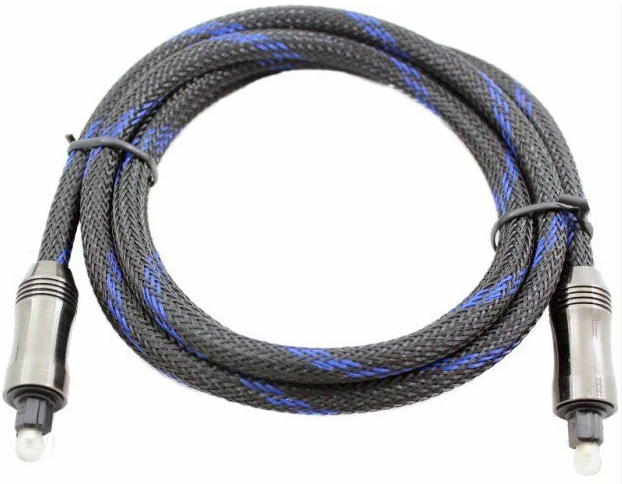
Optical Cord 101: The Ultimate Guide to Crystal Clear Audio

2025-12-19

ScreenShot_2025-12-19_100021_842.jpg

image.png

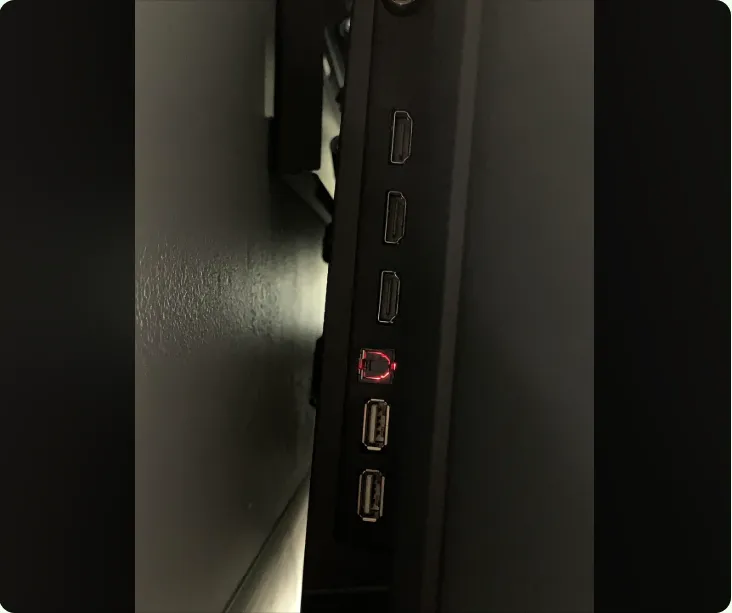
If you are setting up a home theater, soundbar, or gaming station, you have likely encountered a port labeled "Optical," "Toslink," or "S/PDIF." The cable that fits here is the optical cord—a reliable, high-fidelity solution for transmitting digital audio.


While HDMI cables have become the standard for video, the optical cord remains a favorite for audiophiles and tech enthusiasts. In this guide, we break down everything you need to know about optical cords, how they compare to HDMI, and how to choose the right one for your setup.
Optical Cord

What is an Optical Cord?


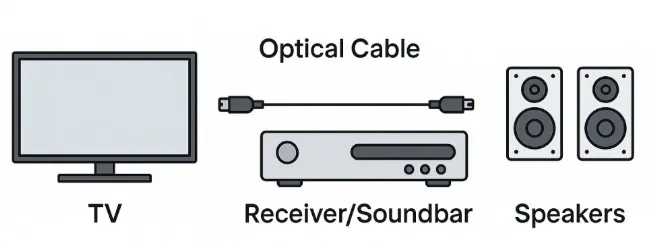
An optical cord (also known as an optical audio cable, Toslink, or fiber-optic audio cable) is a physical connection that uses pulses of light to transmit digital audio signals from a source (like a TV or game console) to a receiver (like a soundbar or amplifier).

Unlike traditional copper wires that use electricity, an optical cord uses fiber optics. This distinct design offers a significant advantage: immunity to interference.


How It Works


Transmission: Your TV converts electrical audio signals into light pulses.

Travel: These light pulses travel through the fiber optic strands inside the optical cord.

Reception: The receiving device (e.g., soundbar) converts the light pulses back into electrical signals and plays the sound.


Optical Cord vs. HDMI ARC: Which Should You Choose?


This is the most common question for home theater users. Both cables send digital audio, but they have distinct differences.


FeatureOptical Cord (Toslink)HDMI ARC / eARC
Audio QualitySupports compressed 5.1 (Dolby Digital, DTS)Supports uncompressed 7.1, Dolby Atmos, DTS:X
Video SignalNo (Audio only)Yes (Audio + Video)
InterferenceImmune to EMI/RFI noiseSusceptible to ground loops/interference
CompatibilityUniversal (Old & New Devices)Requires HDMI-CEC/ARC ports
DurabilityFragile if bent sharplyMore robust


The Verdict:


Use an Optical Cord if: You have an older receiver that lacks HDMI, you are experiencing a "humming" noise (ground loop) with your current setup, or you want a dedicated audio connection separate from your video feed.


Use HDMI ARC if: You need support for Dolby Atmos, TrueHD, or want to control your TV and soundbar with a single remote (CEC).


Top Benefits of Using an Optical Cord


1. Zero Electromagnetic Interference


Because optical cords transmit light rather than electricity, they are completely immune to electromagnetic interference (EMI) and radio frequency interference (RFI). This makes them the perfect choice for complex setups with many power cables and wireless devices that might otherwise degrade signal quality.


2. Broad Compatibility


The optical port is a staple in the tech world. You will find it on:

Smart TVs (Samsung, LG, Sony, etc.)

Soundbars (Sonos, Bose, JBL)

Game Consoles (PS4, Xbox One, and older generations)

PC Sound Cards

DVD and Blu-ray Players


3. Affordable High-Fidelity


You don't need to spend a fortune. Even a budget-friendly optical cord can deliver pristine digital sound, as the digital signal (light) either arrives at the destination or it doesn't—there is generally no "degradation" of sound quality like with analog cables.


Buying Guide: How to Choose the Best Optical Cord


Not all cords are created equal. When shopping on Amazon or at an electronics store, look for these three features:


Connector Fit (Toslink): Ensure the connectors are sturdy. Gold-plated tips are popular, not for conductivity (since it uses light), but because they resist corrosion and protect the fiber tip.


Cable Jacket & Durability: Optical fibers are glass or plastic and can break if bent. Look for an optical cord with a braided nylon jacket or thick PVC, which prevents kinks and protects the delicate core.


Length: Light signals can weaken over very long distances. Try to stick to cords under 15 to 30 feet (5 to 10 meters). If you need a longer run, ensure you buy a high-quality glass-core cable rather than a plastic one.


How to Connect an Optical Cord in 3 Steps


Setting up is plug-and-play, but there is one common mistake people make.


Remove the Caps: Crucial! New optical cords come with tiny plastic caps on the tips to protect the lens. Remove these caps before trying to plug them in, or you might damage your ports.


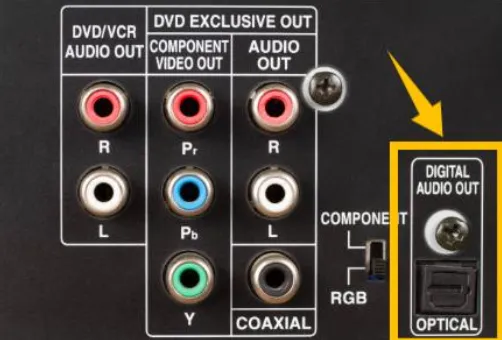
Insert Firmly: Plug one end into the "Digital Audio Out" (Optical) on your TV and the other into the "Digital Audio In" on your soundbar. You should feel a satisfying click.


Change TV Settings: Go to your TV's audio settings. Change the "Sound Output" to Optical or Audio Out.


Pro Tip: If you hear no sound, change the "Digital Output Audio Format" from Auto to PCM or Bitstream.
Optical Cord

FAQ: Common Questions About Optical Cords


Q: Can an optical cord transmit Dolby Atmos?

A: Generally, no. Optical connections are limited to compressed 5.1 surround sound (like standard Dolby Digital). For high-bandwidth formats like Dolby Atmos or DTS-HD Master Audio, you need HDMI eARC.


Q: Why is there a red light coming out of my optical cord?

A: That is the audio signal! The red light is the carrier wave for your digital data. If you see the light at the end of the cable, it means the source device is working correctly.


Q: Are expensive optical cords worth it?

A: For short distances (under 6 feet), a cheap plastic-fiber cord works just as well as an expensive one. For longer runs, investing in a high-quality cord with a glass core can prevent signal dropouts.


Next Steps


Check the back of your TV and soundbar today. If you are currently using red-and-white (RCA) analog cables, switching to an optical cord is the single cheapest upgrade you can make to instantly improve your sound clarity.


Product Inquiry

We use cookie to improve your online experience. By continuing to browse this website, you agree to our use of cookie.

Cookies

Please read our Terms and Conditions and this Policy before accessing or using our Services. If you cannot agree with this Policy or the Terms and Conditions, please do not access or use our Services. If you are located in a jurisdiction outside the European Economic Area, by using our Services, you accept the Terms and Conditions and accept our privacy practices described in this Policy.
We may modify this Policy at any time, without prior notice, and changes may apply to any Personal Information we already hold about you, as well as any new Personal Information collected after the Policy is modified. If we make changes, we will notify you by revising the date at the top of this Policy. We will provide you with advanced notice if we make any material changes to how we collect, use or disclose your Personal Information that impact your rights under this Policy. If you are located in a jurisdiction other than the European Economic Area, the United Kingdom or Switzerland (collectively “European Countries”), your continued access or use of our Services after receiving the notice of changes, constitutes your acknowledgement that you accept the updated Policy. In addition, we may provide you with real time disclosures or additional information about the Personal Information handling practices of specific parts of our Services. Such notices may supplement this Policy or provide you with additional choices about how we process your Personal Information.


Cookies

Cookies are small text files stored on your device when you access most Websites on the internet or open certain emails. Among other things, Cookies allow a Website to recognize your device and remember if you've been to the Website before. Examples of information collected by Cookies include your browser type and the address of the Website from which you arrived at our Website as well as IP address and clickstream behavior (that is the pages you view and the links you click).We use the term cookie to refer to Cookies and technologies that perform a similar function to Cookies (e.g., tags, pixels, web beacons, etc.). Cookies can be read by the originating Website on each subsequent visit and by any other Website that recognizes the cookie. The Website uses Cookies in order to make the Website easier to use, to support a better user experience, including the provision of information and functionality to you, as well as to provide us with information about how the Website is used so that we can make sure it is as up to date, relevant, and error free as we can. Cookies on the Website We use Cookies to personalize your experience when you visit the Site, uniquely identify your computer for security purposes, and enable us and our third-party service providers to serve ads on our behalf across the internet.

We classify Cookies in the following categories:
 ●  Strictly Necessary Cookies
 ●  Performance Cookies
 ●  Functional Cookies
 ●  Targeting Cookies


Cookie List
A cookie is a small piece of data (text file) that a website – when visited by a user – asks your browser to store on your device in order to remember information about you, such as your language preference or login information. Those cookies are set by us and called first-party cookies. We also use third-party cookies – which are cookies from a domain different than the domain of the website you are visiting – for our advertising and marketing efforts. More specifically, we use cookies and other tracking technologies for the following purposes:

Strictly Necessary Cookies
These cookies are necessary for the website to function and cannot be switched off in our systems. They are usually only set in response to actions made by you which amount to a request for services, such as setting your privacy preferences, logging in or filling in forms. You can set your browser to block or alert you about these cookies, but some parts of the site will not then work. These cookies do not store any personally identifiable information.

Functional Cookies
These cookies enable the website to provide enhanced functionality and personalisation. They may be set by us or by third party providers whose services we have added to our pages. If you do not allow these cookies then some or all of these services may not function properly.

Performance Cookies
These cookies allow us to count visits and traffic sources so we can measure and improve the performance of our site. They help us to know which pages are the most and least popular and see how visitors move around the site. All information these cookies collect is aggregated and therefore anonymous. If you do not allow these cookies we will not know when you have visited our site, and will not be able to monitor its performance.

Targeting Cookies
These cookies may be set through our site by our advertising partners. They may be used by those companies to build a profile of your interests and show you relevant adverts on other sites. They do not store directly personal information, but are based on uniquely identifying your browser and internet device. If you do not allow these cookies, you will experience less targeted advertising.

How To Turn Off Cookies
You can choose to restrict or block Cookies through your browser settings at any time. Please note that certain Cookies may be set as soon as you visit the Website, but you can remove them using your browser settings. However, please be aware that restricting or blocking Cookies set on the Website may impact the functionality or performance of the Website or prevent you from using certain services provided through the Website. It will also affect our ability to update the Website to cater for user preferences and improve performance. Cookies within Mobile Applications

We only use Strictly Necessary Cookies on our mobile applications. These Cookies are critical to the functionality of our applications, so if you block or delete these Cookies you may not be able to use the application. These Cookies are not shared with any other application on your mobile device. We never use the Cookies from the mobile application to store personal information about you.

If you have questions or concerns regarding any information in this Privacy Policy, please contact us by email at . You can also contact us via our customer service at our Site.